Describe it. Find it. Drop it into the scene.
Project Manager is an asset browser for 3ds Max that classifies your models and searches them with AI — running entirely on your own machine. No cloud, no credits, no subscription.
Results appear as you type, in over 30 languages. Nothing you type leaves your computer.
No registration, no time limit. First purchase? You may be eligible for a free additional licence.
- 3ds Max2016–2027
- RenderersV-Ray, Corona, Arnold, Redshift, FStorm, Octane and more
- Interface12 languages, including AI-generated category names
- Rated4.97 out of 5 by 88 customers
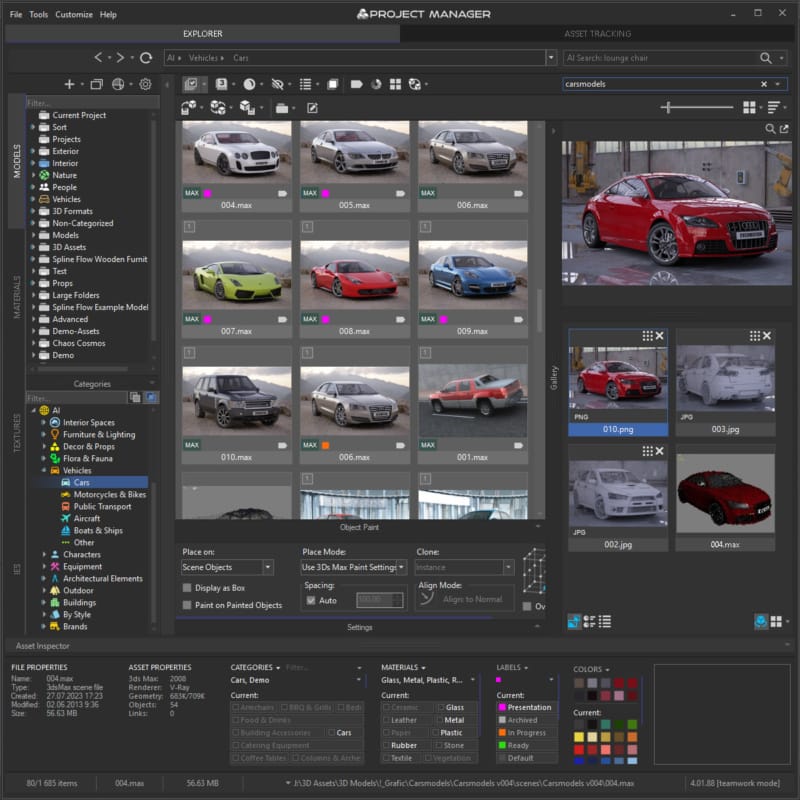
Know what's inside before 3ds Max does
Opening a scene to check what it is costs minutes you never get back. Project Manager shows you the asset, its materials and its dependencies first.
Previews you can rely on
Embedded previews for .max, SketchUp, Revit, DWG, Archvision RPC and more. Interactive render previews for materials, IES, FBX, USD, OBJ and BVH animation — even where no thumbnail was ever saved.
Version and renderer, at a glance
Select a file and its 3ds Max version and renderer appear in the details panel. Filter the library by either, so you stop opening Corona scenes in a V-Ray pipeline.
Materials and links, without opening the scene
The Gallery shows a .max file's material tree and every texture and asset it references. Drag a material straight into your open scene, or fix a missing texture path in place.
Archives that behave like folders
Browse inside ZIP, RAR and 7Z archives, nested folders included, and drag a model into the viewport without unpacking anything first.
Review by Jamie Cardoso, 3ds Max educator
Browsing an archive and merging a model without unpacking
Find it without remembering what it was called
A local AI engine reads your model previews and organises the library for you. The AI proposes, you decide — review, reassign or remove any suggestion.
Automatic classification
3D models are sorted by object type, style, brand and material — glass, wood, metal — with no manual tagging. AI categories are kept apart from your own, so you always know which is which.
Search the way you'd say it
Type "cube glass coffee table" in English, Spanish, Japanese or any of over 30 languages. Set the language for a single query with a prefix — uk:, ja:, deutsch: — without changing your default.
Find Similar — by model, photo or sketch
Pick a model and see everything that shares its shape and style, or drop in a photograph, a render or a rough pencil sketch. Save references as reusable Reference Sets and switch between them in a click.
Colour Search
Pick shades from a palette and find models and textures with a matching colour, using perceptual matching rather than raw RGB.
Smart Categories
Save any text or AI search as a category. It sits in the tree with the rest and shows the matching files every time you open it.
AI text search in your own language
Find Similar from a model or a reference image
Your library never leaves the studio
The language and vision models are downloaded once. From then on, classification and search run on your own GPU.
Safe for NDA work
No previews, file names or queries are uploaded anywhere. What's under NDA stays on your drives.
No credits to ration
Classify the whole library and search all day. There is no meter running and nothing to top up.
Pay once
A lifetime licence for $60. No subscription to renew before you can open your own assets.
For scale: around 500,000 models classify in 8–10 hours on a laptop with an Intel Core i7-12700H and an RTX 4060 (8 GB). It runs in the background at low priority, and you can pause it when you need the GPU for a render.
Assets that arrive ready to render
Drag and drop does the setup: paths fixed, proxies made, materials placed where you meant them to go.
Merge as mesh, proxy or xRef
Bring models in as standard geometry, as V-Ray, Corona, Arnold, Redshift or FStorm proxies, or as xRef objects and scenes. Exclude unwanted objects on merge with your own expressions.
Paint and replace
Paint accessories onto a tabletop or scatter planting across a surface. Swap a scene object for another asset from the library in one step.
Texture paths fixed on the way in
File paths in merged models and materials are corrected automatically, so the asset doesn't arrive with a list of missing maps.
Materials, PBR, IES and HDRI
Drop materials and maps into the Slate or Compact Material Editor, OpenPBR slots included. Build a PBR material from a set of bitmaps in one step. IES files become photometric lights matched to your renderer, and HDRIs go straight into Environment or a material slot.
Merging models, proxies and xRefs
Materials and textures into the Slate Material Editor
A library that doesn't become a second job
The tedious part — thumbnails, broken links, renaming, handing a scene to a render farm — runs in batch.
Batch Render & Relink
Render preview thumbnails for thousands of models, material libraries and IES files with your own studio and presets. Search for, relink and collect missing files across the library in the same pass.
Asset tracking for the open scene
Find missing files, relink them, collect everything into one folder and archive the scene for a colleague or a render farm. xRefs included.
Advanced Asset Renamer
Rename files and their links together using masks, with diacritics replaced and Cyrillic transliterated when you need it.
Built for teams
A shared database keeps folder trees, categories and metadata in sync across workstations, live. Silent installation deploys it to every machine from a script, and a MAXScript API lets you extend it.
Batch Render & Relink
Advanced Asset Renamer
From the people who use it every day
"Copied every file into the right folder, relinked the textures, packed the project and uploaded it for the client in about thirty minutes. I literally saved hours of work on that one operation."
"It clearly feels like a tool built by people who actually use 3ds Max professionally."
"Fills a neglected gap in Autodesk development. Use it every time I open the program."
Try it on your own library
The demo is the real thing with a limit on files, not on time. Point it at your library and see what the AI makes of it.
- No time limit. Use it for as long as you need to decide.
- No registration. Download and install — no email required.
- AI included. Classification, AI search, Find Similar and Colour Search work in full.
- One limit. Every second file in a folder is locked, marked "Demo".